
How to change your shipping addressUpdated 3 months ago
 Written by Rose
 Thank you for choosing Resparked for your recent purchase. We understand that sometimes details need to be updated, and we're here to assist you with changing your shipping address. Please follow the steps below to ensure your order is sent to the correct location.
Steps to Update Your Shipping Address
Access Your Email Inbox
Begin by opening the email inbox associated with the email address you used during your purchase.
Locate the Order Confirmation Email
Search for the order confirmation email we sent you. This email contains important details about your order and a link to update your address.
Click the “View Your Order” Button
Within the order confirmation email, find and click the  button. This will redirect you to the order management page.
Note: Address changes can only be made within 30 minutes of placing your order. After this period, the order will have been processed for shipping, and changes cannot be made.
Edit Order Section
Once redirected, you will be on your order status page; please direct to your “Edit Your Order” section. Here, you can modify your shipping address. Click on "Edit", and you'll be able to make the modifications.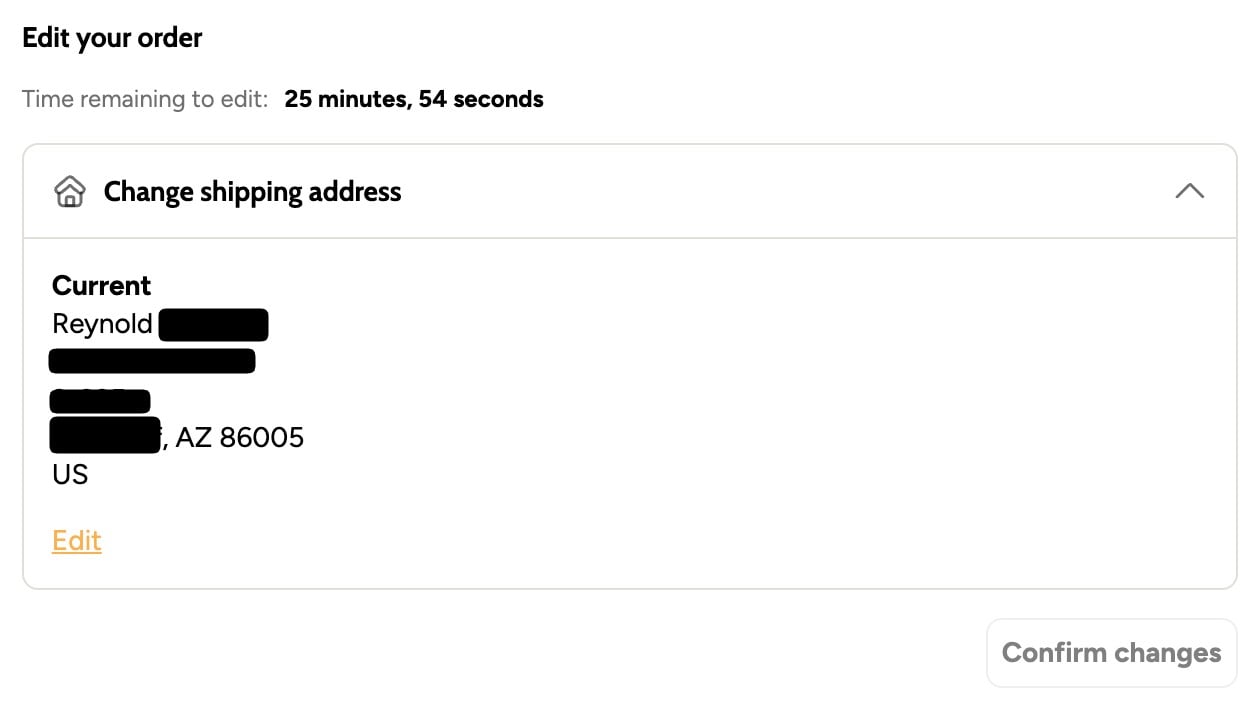
Press the “Confirm Changes” Button once you're done.
Important Note
Please remember that address changes are only possible within the first 30 minutes after your order has been placed. After this timeframe, the order is processed for shipping, and the address cannot be altered.
If you need to change your address after that period of time, please contact support at [email protected] for assistance on how to proceed.
Thank you once again for choosing Resparked. For more information about our products and services, visit our online store.